Admin exam editor
The admin editor is launched from exam management by clicking on the edit button. Only versions having status Proposal are editable.
New Question
A new question contains an empty block Question. The exam is then constructed by adding different functional blocks (e.g. Subquestion, Paragraph, etc.) together. Each block can have different child blocks.
Overview over functionality
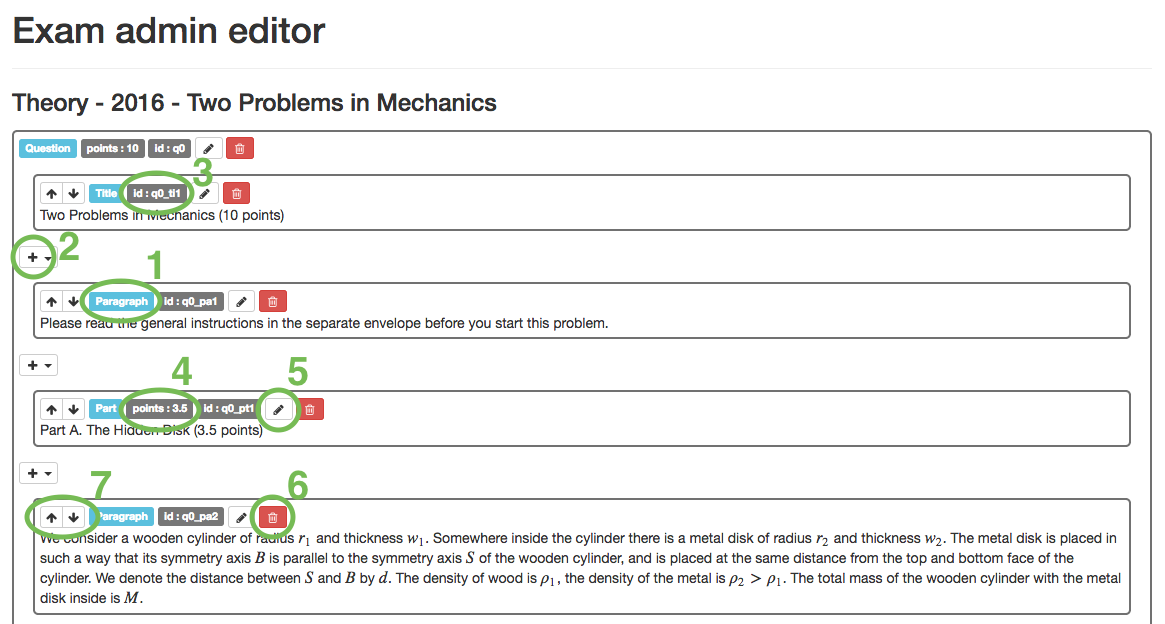
- 1 - Name of the block, click here for more details about which block does what.
- 2 - Add a new block. Not all blocks may contain all other blocks, for more details see the valid children section of the description of each block.
- 3 - Unique id of each block. IMPORTANT: never change the id.
- 4 - Number of points in the Question, Part or Subquestion. This information is used for the marking section of the ExamTools.
- If the block has more attributes they are shown here as well.
- 5 - Edit the attributes and the content of the block.
- 6 - Delete the block.
- 7 - Move blocks up and down with respect to each other.
View PDF
The View PDF button shows the compiled version of the question. It is good practice to compile regularly, in order to identify compilation errors as soon as possible.
Accept
In order to make a question visible to the delegation it has to be accepted. If a version is accepted it can not be changed anymore. To continue working on the question a new version has to be created. When clicking on Accept all the changes made are shown and can be revised.
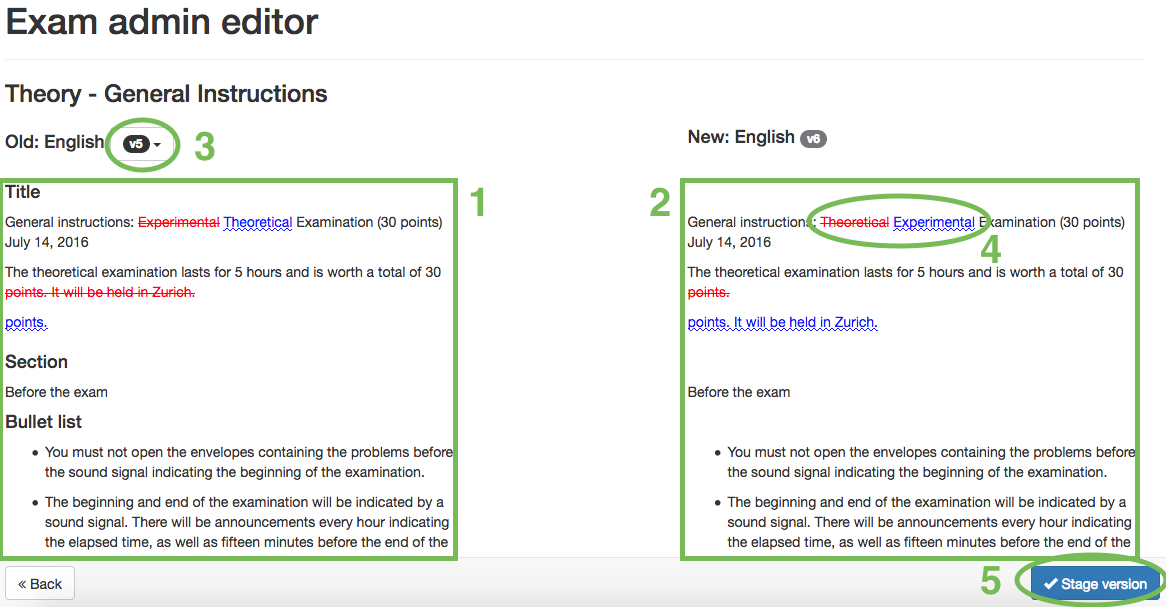
- 1 - Content of the old version of the exam.
- 2 - Content of the new version that you currently want to accept.
- 3 - Choose the old version (if there is more than one previous one).
- 4 - All changes made between the two versions.
- 5 - Stage version, by clicking here the version is accepted and will show up with status staged in the exam management. This is still not visible to the delegations. To make it visible, all staged versions can be published in the exam management.
Functional Blocks
Each block has different attributes that define its properties. IMPORTANT: Do not ever change the attribute "id"!
Question
Main block of the question. Exists only once.
No block content.
Attributes:
| Key | Specification |
|---|---|
| points | Total number of points in the whole question. |
Valid children: Title Section Part Subquestion Answer Answer continuation Paragraph like blocks Box Pagebreak Latex blocks
Title
Block content: e.g. "Large Hadron Collider (10 points)".
No attributes.
No children.
Section
Block content: e.g. "Linear Acceleration:".
No attributes.
No children.
Part
Block content: e.g. "Part A. LHC accelerator (6 points)".
Attributes:
| Key | Specification |
|---|---|
| points | Total number of points in this part. |
No children.
Subquestion
No block content.
Attributes:
| Key | Specification |
|---|---|
| points | Number of points in subquestion. |
| part_nr | Part the subquestion belongs to, e.g "A". |
| question_nr | Question the subquestion belongs to, e.g "1". |
Valid children: Paragraph like blocks Latex blocks
Answer
No block content.
Attributes:
| Key | Specification |
|---|---|
| points | Number of points for the answer. |
| part_nr | Part the answer belongs to, e.g "A". |
| question_nr | Question the answer belongs, to e.g "1". |
| height | Define space available to write the answer, e.g. "4 cm". |
Valid children: Paragraph like blocks Latex blocks
Answer continuation
No block content.
Attributes:
| Key | Specification |
|---|---|
| part_nr | Part the answer belongs to, e.g "A". |
| question_nr | Question the answer belongs, to e.g "1". |
| height | Define space available to write the answer, e.g. "4 cm". |
Valid children: Paragraph like blocks Latex blocks
Paragraph like blocks
Paragraph
Block content: any text.
No attributes.
No children.
Figure
No block content.
Attributes:
| Key | Specification |
|---|---|
| figid | id referring to figure (see Figure Management). |
| width | Multiplier for the width of the figure, default value: "0.5". |
| use_width_as_scale | If set to "1", the width is interpreted relative to the original image size. |
Valid children: Figure caption Figure text
Equation / Equation*
Block content: Latex equation e.g. "I=I_0 - \frac{U}{R_\text{int}}".
No attributes.
No children.
Equation is numbered, Equation* is not.
Bullet List
No block content.
No attributes.
Valid children: List item
Table
No block content.
| Key | Specification |
|---|---|
| width | Number of columns in table, has to be set if columns is not set. |
| top_line | Number of lines, default: "1". |
| left_line | Number of lines, default: "1". |
| right_line | Number of lines, default: "1". |
| grid_line | Number of lines, default: "1". |
| columns | Advanced: Used to customize columns, (do not set at same time as width) |
Valid children: Table row Table caption
Box
Draw box around another block.
No block content.
No attributes.
Valid children: Paragraph like blocks Latex blocks
Figure Caption
Block content: e.g. "Figure 1: Sketch of an accelerator module."
No attributes.
No children.
Figure Text
Block content: Text shown in figure, e.g. "transverse plane"
Attributes:
| Key | Specification |
|---|---|
| name | Name referring to parameter in figure, e.g. "transverse" (see Figure Management). |
No children.
List item
Block content: Item text.
Attributes:
| Key | Specification |
|---|---|
| Label | Label in front of each item, (e.g. " " (space) for no bullet). |
| If no label set a bullet point shows up. |
No children.
Table row
No block content.
Attributes:
| Key | Specification |
|---|---|
| bottom_line | Number of lines, default: "1". |
| multiplier | Repeat the row n times, default: "1". |
Valid children: Table cell
Table Cell
Block content: Cell content.
No attributes.
No children.
Table Caption
Block content: e.g. "Table 1: Typical numerical values of relevant LHC parameters.".
No attributes.
No children.
Pagebreak
Start new page.
No block content.
Attributes:
| Key | Specification |
|---|---|
| skip | Do not perform the pagebreak. The purpose of this is to skip it in |
| specific languages (via attribute change). |
No children.
Latex Blocks
These are more advanced blocks to create blocks with special properties. If possible this blocks should not be used.
Latex replacement template
No block content.
Attributes:
| Key | Specification |
|---|---|
| content | TODO |
Valid children: Latex replacement parameter
Latex environment
No block content.
Attributes:
| Key | Specification |
|---|---|
| name | TODO |
Valid children: Title Section Part Subquestion Answer Paragraph like blocks Box Pagebreak Latex blocks
Latex replacement parameter
Block content: TODO
Attributes:
| Key | Specification |
|---|---|
| name | TODO |
No children.